Outline and shapes
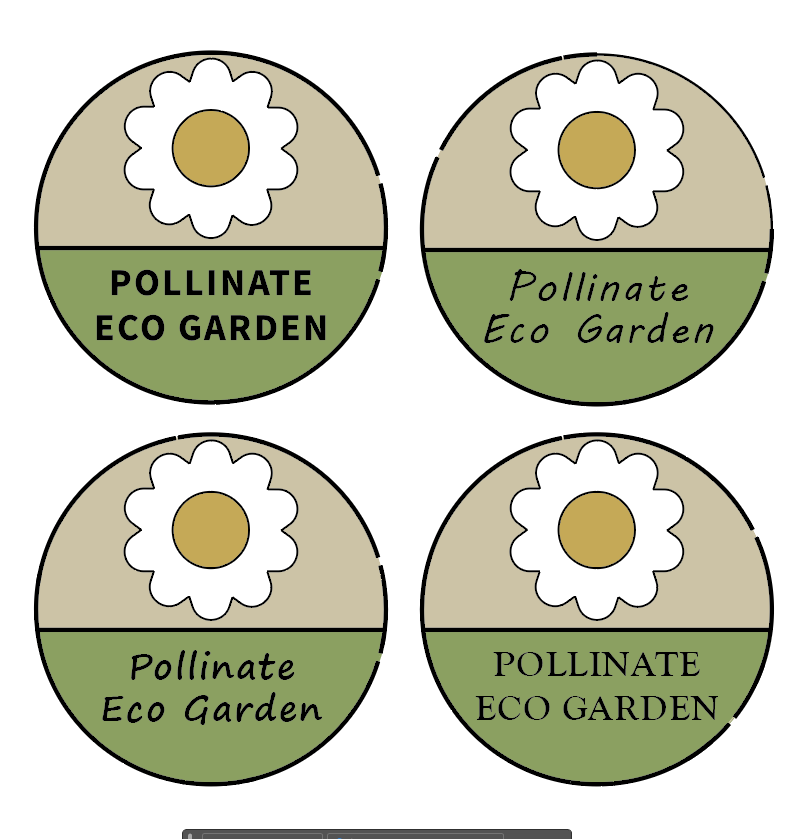
When attempting to create the variations of the original logo, I began to have problems mainly to do with the outline of the logo. At first, it was working ok with the outline being a consistent black line, however after copying the logo to try different variations, parts of the outline started to disappear or become thinner. To be fair, I made this shape in a very inefficient way as I was struggling to create the semi-circle in the lower half. This doesn’t explain why it ended up changing however, as all 4 times I copied it, the outline broke in different ways even if I didn’t change anything.
To solve this problem, in the second design I had to completely restart the logo even though the general shape was exactly the same. Because I was feeling more confident with creating the shapes needed this time though, it seemed a lot easier to make them and without any mistakes, which is probably why something went wrong in the last as I had to keep retrying it.
Flower Petals
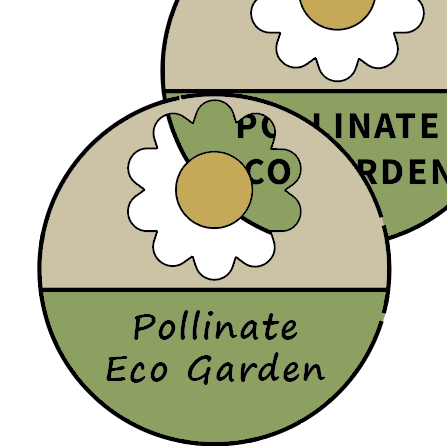
Making the petals for the flower was a drag as I was struggling to make each petal look right. Firstly, I tried making one petal and copying it at different angles, but even then, they were unevenly spaced and different lengths. It didn’t look right, so I then tried using a star shape and softening the edges to a more rounded shape. This sort of worked, but when using the “Shaper” tool to join both stars, I think I ended up combining it into the background as well, but it was too late to undo when I realised this. The flower petals somehow then became see-through, which I only realised when moving the logo across above another version.
I never managed to solve this issue, but this wasn’t too important as this version didn’t end up being used. Overall, this version didn’t have many things right with it, but it was a good way of learning how to make the next version technically right and work without issue.
Animated Logo Gif
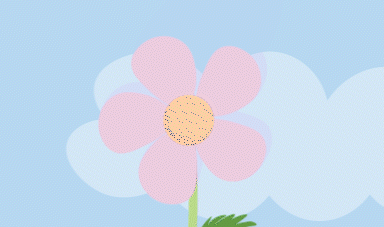
When rendering the animation into a gif, there ended up being a few visual glitches mainly on the flowers, where they seemed to have a duplicated shadow but also flashing dots within the centre of them. When rendered as a video however, these issues were not there. To get round this issue I ended up having to convert the video to a gif through Adobe’s website which ended up having a large effect on the quality but at least stopped the visual problems.