Research Overview
For this project, the plan I have is to create either an educational Augmented Reality or Virtual Reality app that will help users understand the issues related to Hornsea Mere’s water pollution. Either way will incorporate the same core idea of being able to explore either the area around the mere or a mere inspired location through the app.
Users would be able to move through the area and look at different features around it. There would be some sort of prompt to aim user’s views towards certain areas where information boxes will then appear to inform the user of the related issue. These would include an issue description, how serious the issue is, and how people can help to reduce/resolve the issue.
The project is currently being undertaken by Groundwork Yorkshire who have gained a Water Restoration Fund grant1; however, they do not have many things available to help raise awareness on the issue apart from a couple of articles available online. Having an interactive experience available to users will create an engaging environment that users can learn about the issues in that would also be easily shareable especially if it is VR as you would not need to be on location to use that app.
The Mere has a 10km circular trail around it that walkers can access, along with smaller paths around the cafe and car park area.2 If an Augmented Reality experience was created, it could be accessed by scanning a QR code on one of these paths to show information around that select area in specific places from that viewpoint. Unlike in VR, you would not need to create boundaries to restrict user movement as the users would already be restricted by existing boundaries in real life, encouraging the user to stick to the paths.
With Augmented Reality being more accessible than VR as all you need is a smartphone, it will open the experience to more people. VR can also cause more motion sickness with users as they feel more in that world because it is all you can see, opposed to only seeing it through your phone where you can always have the option to look away without needing to remove a headset.
To keep the experience more engaging than just adding information around the area, including animal species that live in that habitat can add an extra layer of interest but also education. There are many different species of birds which can be spotted in the area, so creating different models of birds and placing them around can give the user more features to spot and possibly learn about as an extra feature. There are also a mix of plants that can be found in the area too which could be used to add more colour to the area.3
Project Plan
The easiest way for users to interact with this Augmented Reality experience would be by scanning QR codes. Many/most smartphones nowadays have QR compatible cameras built in, meaning all they have to do to access the experience is point their camera at the code. This increases the ease of access to the experience as users do not have to type links or have the risk of image recognition not working.
Instead of having 1 build that would be used for a large area, splitting it up into multiple scenes could make it more accessible as then it would be less resource heavy, improving performance. This will be decided once research has started, as you may be able to see all/most issues from one area anyway. Better performance makes it less likely that users will get frustrated with a slow app and end up not using it at all. This also would break up the experience allowing the user to also still enjoy looking at the real scenery, not just through their phone. Overall, it would be more accessible too, as there would be more points of access, meaning if users entered the trail at a different point, they could find different scenes to explore instead of one main one at the main entry. Scaling the project down into multiple smaller scenes would also make the workload less as it would be easier to figure out real life scaling in smaller scenes.
Milestone Aims
Trello Board
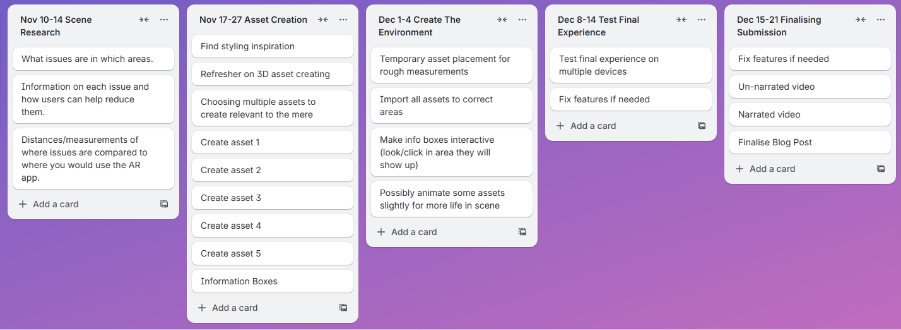
Scene Research
Because this experience will be Augmented Reality, I need to make sure that any objects in the virtual scene work well with what is in the real scene. This means that rough measurements will be required to accurately depict objects around the user and make information line up properly with their real-life versions.
Because the purpose of this experience is to help users understand issues the mere is facing, different scenes may focus on different issues. Some scenes could cover some of the same issues but having them spread over a couple of different scenes could encourage the users to explore the area more than if all information was given to them in one scene. It would also increase the ease of use as one scene wouldn’t end up being overcrowded with information if the information is spread across multiple.
To make sure the information is accurate, finding details on the issues are a must. Knowing what the issues are will also direct what 3D assets are made as these will be used to help show the issues that are present. With it being an educational experience, information needs to be correct to help users properly understand the issue.
This shouldn’t need too much time as sites like Google Maps and Google Earth will be helpful for finding rough distances. If they are roughly correct, the assets should look fine especially because it will be used on a smaller screen meaning users will not be able to overanalyse each asset.
3D Assets
3D assets will be used to bring more life and interest to the experience than just showing information on issues. Assets will include features such as trees and plants inspired by what are there in real life, and animals which also have habitats around the area. These would mainly be placed around where the information would be displayed to guide the viewer’s attention in that direction. It would make using the app much easier as users would roughly know where to look for the information instead of having to guess until they were right.
Assets such as animals could be animated too to create a more dynamic scene. This could include features such as swans and geese swimming or birds flying past. Birds, for example, could fly towards where information is shown so that they would be guiding the user towards it. Trees and plants could have a slight sway to them to depict a light breeze, also making them look more stylised than just being static. A slight bit of movement would also make them stand out more and add more life to the virtual side.
I expect that this will be the longest task. Creation of multiple complex shapes will need to be done, so allocating around 2 weeks should be enough to learn any new skills I will need and create a variety of assets to add life and style to the experience. 1 of each asset should be enough, with the size and rotation of multiple of these making the scene look unique instead of clearly copied and pasted assets. Because the assets will only be used in areas where information needs to be shown, it is not necessary to create assets for the whole area as this would take a too much time and make finding the information much more difficult.
Creating the Environment
To make an environment that works well with the real-life area, it will be important to get roughly accurate measurements from where the user would be standing to where any assets would be placed. This is so that the perspective of the scene will look correct in both distance and scaling.
To improve the performance of the overall experience, a lower poly approach may work better as having less detail will put less stress on systems, especially lower end spec devices. High amounts of detail would not be necessary anyway, as many objects will be far away from where the user would be viewing them from, such as across the mere. If some animal species were to be involved however, a reasonable amount of detail will be required to make them visually appealing to the user. Making the experience easier for devices to run will also help reduce the environmental impact it will have as it will not use up as much energy on the devices.
This should be one of the quicker stages of development as it will mainly be bringing together everything that’s already been created and researched. Multiple assets will need to be imported and laid out to make a notable difference within the real scene, with the user then able to click that area or point their device towards it to bring up the information boxes on the researched issues in that area. Having possible small animations such as tree swaying will make these areas livelier rather than static models, however this will be time dependent and a finalisation after the main parts are completed.
Testing the Experience
For making sure the experience is as accessible as possible, testing on multiple different mobile devices would be beneficial to make sure everything works as expected. There may become an issue where older devices are not AR compatible or cannot scan QR codes, so for QR codes there could also be a typable link below just in case it does not work for some reason.
Users need to find the experience informative and educational, but not addictive. The balance of detail needs to be enough for a user to want to use the app, but not so much that they spend more time looking through their phone than at the real scene. Only having detail and information in specific areas will mean that once a user has viewed the information, they can then go back to enjoying real life. One issue, however, is for a specific user it could end up being a one-time use using the experience, as once they’ve learnt the issues then they will not need to look again. The interactive element of looking for the information would also not be as effective anymore as you would then know where everything already is.
After testing this, I will be able to find any issues that I wouldn’t have originally known before. The chance to fix these issues can then be taken so that all users can have a stress-free experience whilst using the app to increase the usability and accessibility of it. Having a smooth performing app will encourages users to try it out and recommend it to others so that the issues can be raised to more people and help to decrease the environmental impact that the water pollution is having.
Concept Storyboard
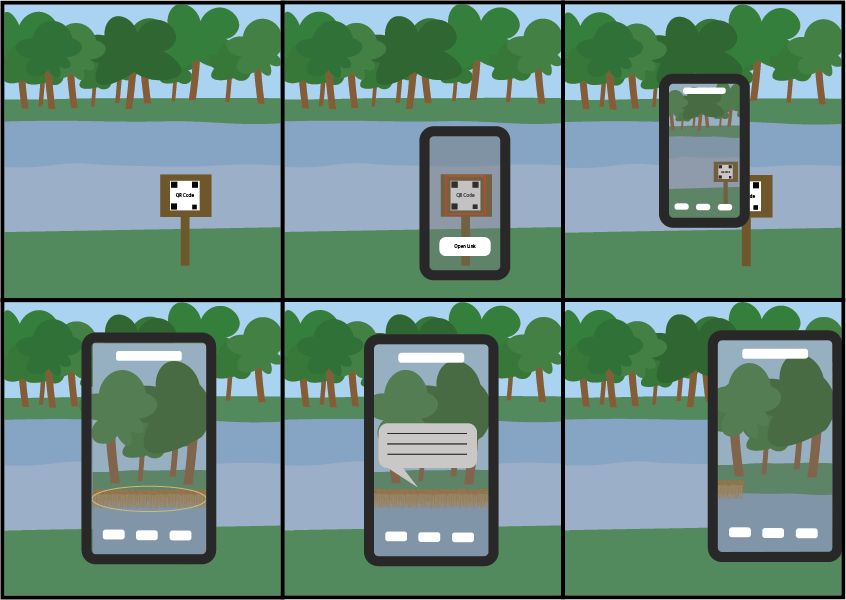
To use the app, users would start by going to a specific area where there will be a QR code. They will then be able to use their smartphone camera (or QR code scanner app) and aim it directly at the QR code. This will bring up the option to go to the link. Once the link has loaded, a basic user interface will appear so that users know they are now in a new app on their device where they can then look around the scene they are standing in through their phone. Different assets related to the water pollution around the mere will be able to be found that aren’t clearly visible in real life. Once the user points their device roughly at the assets, it will bring up information about what the asset is, how it’s effecting the mere, and any ways people can help to reduce its impact if it is negative. Once the user is done reading, they can start moving away from that asset where the information box will then close so they can easily see again. This process would repeat for all the assets on scene, which could mean a “progress tracker” could be helpful so you know how many assets you can find and how many you already have found.
M. Pells (2025) Funding for Plan to Revitalise Hornsea Mere Available Online: https://www.thisisthecoast.co.uk/news/local-news/funding-for-plan-to-revitalise-hornsea-mere [Accessed 02/10/25]
East Yorkshire (2024) Hornsea Mere Available Online: https://www.visiteastyorkshire.co.uk/listing/hornsea-mere/129979101/ [Accessed 02/10/25]
Yorkshire Coast Nature (2024) Hornsea Mere Available Online: https://www.yorkshirecoastnature.co.uk/destinations/17/hornsea-mere [Accessed 02/10/25]